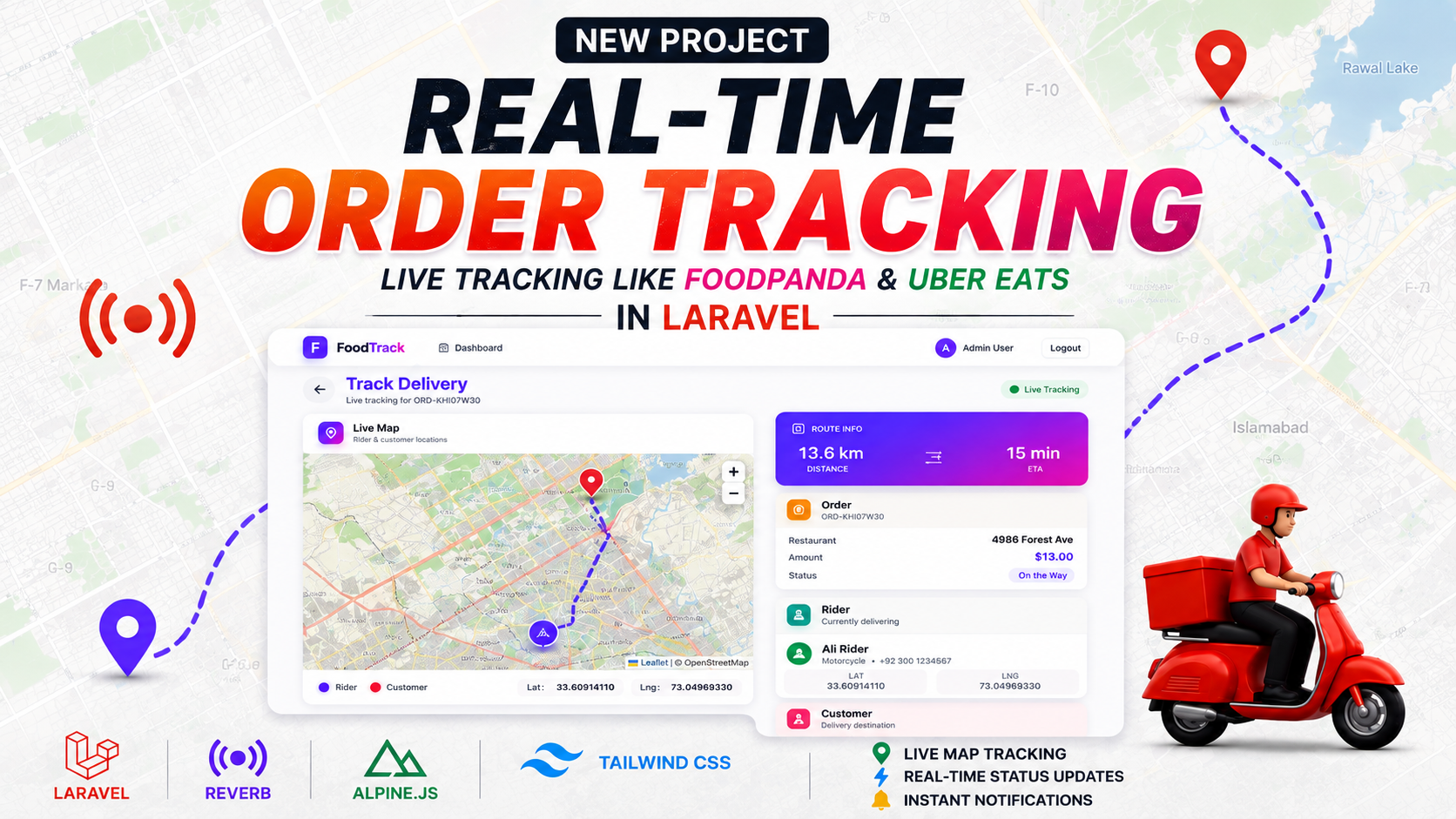
Real-Time Order Tracking System with Laravel, Reverb & Alpine.js
Introduction
Modern delivery platforms have changed customer expectations. When someone places an order online, they no longer want to see only a message such as “Your order is on the way.” They want to know where the delivery rider is, how far away the order is, what stage the delivery has reached, and approximately when it will arrive.
This is where real-time order tracking becomes important.
In this project, I built a complete Real-Time Order Tracking System using Laravel, designed around the type of tracking experience commonly found in food delivery, courier, logistics, and e-commerce applications.
The system combines Laravel, Laravel Reverb, WebSockets, Alpine.js, Tailwind CSS, Leaflet.js, and OpenStreetMap to create a live delivery tracking experience.
The main objective of the project is to demonstrate how a traditional Laravel application can be extended with real-time communication and location tracking to create a much more dynamic user experience.
🚀 Project Overview
The application is designed around a simple delivery workflow.
A customer places an order and the order is assigned to a delivery rider. Once the rider starts the delivery, the tracking interface provides real-time information about the delivery.
The customer can monitor:
-
Rider's current location
-
Customer's destination
-
Delivery route
-
Order status
-
Distance remaining
-
Estimated arrival time
-
Rider information
-
Order information
-
Live coordinates
The application continuously reflects the latest available information so the customer does not need to repeatedly refresh the browser.
🎯 The Main Goal of the Project
The purpose of this project is not only to display a map. The goal is to demonstrate how different technologies can work together to build a complete real-time workflow.
The system combines three major areas:
1. Application Management
Laravel manages the application logic, orders, users, riders, authentication, and business processes.
2. Real-Time Communication
Laravel Reverb and WebSockets allow the backend to send updates to connected users without relying on traditional page refreshes.
3. Location & Mapping
Leaflet.js and OpenStreetMap provide the visual layer that displays rider locations, customer destinations, routes, and other geographic information.
Together, these components create the complete tracking experience.
📍 Real-Time Rider Tracking
One of the most important features of the project is live rider tracking.
A delivery rider can provide location information while travelling to the customer. That location can then be processed by the backend and sent to the customer's tracking interface.
For example, the rider may move from:
Location A → Location B → Location C → Customer
As the rider moves, the tracking interface can update the marker on the map.
This means the customer can see the delivery progressing instead of seeing only a static order status.
Example
A customer may see:
Order #ORD-1234
🚴 Rider: Ahmed
📍 Distance: 2.4 km
⏱️ ETA: 12 minutes
🔄 Status: On the Way
At the same time, the map shows the rider's current position and route.
🗺️ Live Map & Route Visualization
The project uses Leaflet.js for the interactive map interface and OpenStreetMap for map data.
Leaflet provides a lightweight way to display interactive maps inside a web application.
The map can contain multiple important elements:
Rider Marker
Shows where the delivery rider is currently located.
Customer Marker
Shows the delivery destination.
Route
Displays the path between the rider and the customer.
Location Information
The system can also display geographic information such as:
-
Latitude
-
Longitude
-
Distance
-
Estimated travel time
The combination of these elements creates a much more understandable delivery experience.
⚡ Laravel Reverb for Real-Time Communication
A major component of this project is Laravel Reverb.
Traditional web applications commonly work like this:
Browser → Request → Server → Response → Browser
If the browser needs new information, it must make another request.
For a real-time tracking system, constantly sending requests is not an ideal user experience.
Instead, this project uses a real-time communication architecture:
Event Occurs → Server Broadcasts Event → Connected Client Receives Update
Laravel Reverb provides the WebSocket infrastructure required for this communication.
This allows connected clients to receive updates as they happen.
🔌 How WebSockets Fit Into the System
WebSockets provide a persistent communication channel between the browser and server.
Once a client is connected, the server can send information to that client without requiring a new HTTP request every time.
For example:
Rider Location Changes
↓
Laravel Processes New Location
↓
Event Is Broadcast
↓
Laravel Reverb
↓
Customer Browser Receives Update
↓
Map Marker Moves
This makes the application feel truly real time.
🔄 Real-Time Order Status
Location tracking is only one part of delivery tracking.
The system also supports real-time order status updates.
A typical order lifecycle can look like:
Processing → Confirmed → Picked Up → On the Way → Delivered
When an administrator, restaurant, or rider changes the order status, that information can be broadcast to the customer.
For example:
Processing
The order has been received and is being prepared.
Confirmed
The order has been confirmed.
Picked Up
The rider has collected the order.
On the Way
The rider is travelling toward the customer.
Delivered
The order has reached the customer.
The customer can see the latest state without manually refreshing the page.
📦 Order Tracking Dashboard
The tracking dashboard is designed to combine operational information and live location information.
Instead of separating the map and order details into different screens, the system brings them together.
The dashboard can display:
Order Information
-
Order number
-
Order amount
-
Pickup location
-
Destination
-
Current status
Rider Information
-
Rider name
-
Vehicle
-
Contact information
-
Current location
Delivery Information
-
Distance remaining
-
ETA
-
Route
-
Current coordinates
This provides both customers and administrators with a complete overview of the delivery.
👨🚴 Rider Information
The rider is an important part of the delivery workflow.
The tracking interface can display information about the rider responsible for the current order.
For example:
Rider: Ahmed Khan
Vehicle: Bike
Status: On the Way
Distance: 1.8 km
ETA: 8 minutes
This information can be displayed alongside the live map so customers know not only where their delivery is, but also who is handling it.
👤 Customer Tracking Experience
From the customer's perspective, the main objective is simplicity.
The customer should not need to understand how WebSockets, Laravel events, or location services work.
They simply need to open the tracking page and see:
📍 Where the rider is
🛣️ Where the rider is going
⏱️ How long the delivery may take
📦 What the order status is
🚴 Who is delivering the order
All of the underlying technical work happens behind the interface.
📡 Location Update Flow
A typical location update can follow this process:
Step 1 — Rider Location Is Captured
The delivery application obtains the rider's current coordinates.
Step 2 — Location Is Sent to the Backend
The location information is sent to the Laravel application.
Step 3 — Laravel Processes the Update
Laravel validates and processes the new coordinates.
Step 4 — Event Is Broadcast
The application broadcasts an event containing the updated location.
Step 5 — Reverb Delivers the Event
Laravel Reverb handles the WebSocket communication.
Step 6 — Customer Receives the Update
The customer's browser receives the new location.
Step 7 — Map Updates
The rider marker is moved to the latest position.
This process allows the interface to update dynamically.
🧩 Alpine.js for Frontend Interactions
The frontend uses Alpine.js for lightweight interactive functionality.
Alpine.js is useful for controlling UI behavior without requiring a large frontend framework for every interaction.
It can be used for things such as:
-
Updating UI elements
-
Showing and hiding panels
-
Managing tracking state
-
Updating order information
-
Handling lightweight frontend interactions
-
Reacting to real-time events
This keeps the frontend relatively lightweight while still providing dynamic behavior.
🎨 Tailwind CSS for the Interface
The project uses Tailwind CSS to create the visual interface.
The dashboard is structured around the most important tracking information.
The interface can contain:
-
Live map
-
Order card
-
Rider card
-
Status indicator
-
ETA information
-
Distance information
-
Route information
Tailwind CSS makes it easier to maintain a consistent design across the application and adapt the interface for different screen sizes.
📱 Responsive Tracking Dashboard
A delivery tracking application needs to work across different devices.
Customers may open their tracking page from:
-
Desktop computers
-
Laptops
-
Tablets
-
Smartphones
The dashboard therefore uses a responsive layout so that the most important information remains accessible regardless of screen size.
On smaller devices, the layout can prioritize the map and important order information while keeping supporting details easily accessible.
🛠️ Technologies Used
Backend
Laravel
Laravel is responsible for the main application logic, routing, business rules, data processing, and server-side functionality.
PHP
PHP powers the Laravel backend and handles the application requests and processing.
Laravel Reverb
Laravel Reverb provides the real-time WebSocket communication layer.
Laravel Broadcasting
Laravel's broadcasting system is used to publish events to connected clients.
💻 Frontend Technologies
Alpine.js
Used for lightweight reactive interactions and dynamic UI behavior.
Tailwind CSS
Used to create the responsive interface and visual styling.
JavaScript
Used for client-side logic and communication with the real-time layer.
🗺️ Mapping Technologies
Leaflet.js
Used to render the interactive map and manage map markers and visual elements.
OpenStreetMap
Provides the underlying map data displayed through Leaflet.
Geolocation
Used as part of the location-tracking workflow to work with geographic coordinates.
⚡ Real-Time Technologies
WebSockets
Provide persistent real-time communication between connected clients and the server.
Laravel Reverb
Provides the WebSocket server and real-time infrastructure.
Event Broadcasting
Allows application events to be delivered to connected clients.
🔥 Key Features in Detail
1. Live Rider Location
The system can display the rider's current position on a map.
2. Customer Location
The customer's delivery location is displayed as a destination marker.
3. Live Route
The map can visualize the route between the rider and customer.
4. Real-Time Order Status
Order status updates can appear immediately when changes occur.
5. Distance Tracking
Users can see the remaining distance to the destination.
6. ETA
Estimated arrival time can be displayed to help customers understand when the order is expected.
7. Rider Details
Relevant rider information can be presented directly in the tracking interface.
8. Customer Information
The system can associate the delivery with the correct customer and destination.
9. Real-Time Notifications
The same real-time architecture can be extended to provide instant notifications.
10. Responsive Dashboard
The interface is designed to work across different devices and screen sizes.
🔐 Data & Application Architecture
A production-ready version of this type of application would typically separate several important responsibilities.
For example:
Customer
↓
Creates Order
↓
Order
↓
Assigned to Rider
↓
Rider
↓
Sends Location
↓
Laravel Backend
↓
Broadcast Event
↓
Laravel Reverb
↓
Customer Tracking Interface
This separation makes the system easier to maintain and expand.
🧠 Example Real-Time Event Flow
Imagine a rider moves from one location to another.
The application can generate an event such as:
RiderLocationUpdated
The event may contain information such as:
-
Order ID
-
Rider ID
-
Latitude
-
Longitude
-
Timestamp
-
Delivery status
The event is then broadcast to the appropriate channel.
The customer's browser receives the event and updates the map.
No complete page reload is necessary.
📊 Example Tracking Scenario
Imagine a customer places an order.
Stage 1 — Order Created
The system creates the order and assigns it a unique order number.
Stage 2 — Order Confirmed
The restaurant or seller confirms the order.
Stage 3 — Rider Assigned
A rider is assigned to the order.
Stage 4 — Order Picked Up
The rider collects the order.
Stage 5 — Rider Starts Moving
The application begins sending location updates.
Stage 6 — Customer Tracks Delivery
The customer opens the tracking page and sees the rider moving on the map.
Stage 7 — Order Arrives
The rider reaches the destination.
Stage 8 — Order Delivered
The final status is changed to Delivered.
This entire workflow can be enhanced with real-time broadcasting.
💡 Where This System Can Be Used
The same technical architecture can be adapted to many industries.
🍔 Food Delivery
Track food orders from restaurants to customers.
📦 Courier Services
Track packages and delivery personnel.
🛒 E-commerce
Show customers where their delivery is currently located.
🥦 Grocery Delivery
Track grocery riders and estimated delivery time.
💊 Pharmacy Delivery
Track urgent medicine deliveries.
🚚 Fleet Management
Monitor vehicles and their locations.
🧑🔧 Field Services
Track technicians traveling to customer locations.
🚕 Transportation
The same concepts can be extended to ride-sharing and transportation applications.
🚀 Possible Future Improvements
The current project provides a strong foundation, but many additional features can be added.
Push Notifications
Send notifications when important delivery events occur.
Multiple Riders
Support multiple active delivery riders.
Route Optimization
Calculate more efficient routes based on distance and traffic information.
Delivery Zones
Define geographic areas where riders can accept deliveries.
Rider History
Store and visualize previous rider routes.
Location History
Allow administrators to review the movement history of a delivery.
Driver Availability
Track whether riders are available, busy, offline, or on another delivery.
Mobile Application
Connect the backend to a dedicated Android or iOS rider application.
Advanced Analytics
Provide statistics for delivery times, rider performance, completed orders, and delivery efficiency.
Authentication & Authorization
Implement role-based access for customers, riders, restaurants, and administrators.
📈 Why Real-Time Tracking Is Important
Traditional order tracking often provides only static information.
For example:
Order Status: Out for Delivery
This tells the customer very little.
A real-time tracking system provides much more useful information:
📍 Rider's current location
🛣️ Current route
📏 Remaining distance
⏱️ Estimated arrival
🔄 Current delivery status
This improves transparency and gives customers a better understanding of what is happening with their order.
For businesses, it can also provide better operational visibility and a foundation for more advanced logistics features.
🎥 Project Demo
The accompanying video demonstrates the complete project and shows the tracking interface in action.
You can see:
-
Live rider tracking
-
Customer location
-
Interactive map
-
Delivery route
-
Order information
-
Rider information
-
Delivery status
-
Distance
-
ETA
-
Real-time updates
The video demonstrates how these components come together to create a modern real-time delivery experience.
🧑💻 What Developers Can Learn from This Project
This project is useful for developers who want to understand how to combine traditional backend development with modern real-time technologies.
Some of the key concepts include:
-
Laravel event broadcasting
-
Laravel Reverb
-
WebSocket communication
-
Real-time frontend updates
-
Geographic coordinates
-
Interactive maps
-
Location tracking
-
Responsive dashboards
-
Event-driven application architecture
These concepts can also be reused in applications outside delivery tracking.
For example, the same real-time architecture can be used for chat applications, notification systems, live dashboards, monitoring systems, collaborative applications, and many other products.
🌐 From a Traditional Laravel App to a Real-Time Application
One of the biggest advantages of this project is that it demonstrates how an existing Laravel architecture can be extended.
A normal Laravel application may process a request like:
User Request → Laravel → Database → Response
A real-time application can introduce another layer:
User Action → Laravel → Event → Reverb/WebSocket → Connected Clients
This architecture makes it possible to notify users immediately when something changes.
The result is a more interactive experience without requiring users to continuously refresh the page.
🏗️ Project Architecture
At a high level, the system can be understood as several connected layers:
Client Layer
Customer and rider interfaces.
Application Layer
Laravel handles authentication, orders, business logic, users, and delivery operations.
Real-Time Layer
Laravel Broadcasting and Reverb handle real-time event delivery.
Mapping Layer
Leaflet.js and OpenStreetMap provide the map and geographical visualization.
Data Layer
The application stores information such as users, orders, riders, locations, and delivery statuses.
This layered approach makes the application easier to maintain and expand.
✅ Project Benefits
The real-time order tracking architecture provides several important benefits.
Better Customer Experience
Customers can see what is happening with their order rather than waiting without information.
Better Operational Visibility
Administrators can monitor active deliveries.
Faster Updates
Changes can be delivered instantly through WebSockets.
Better Scalability
The architecture provides a foundation for additional real-time features.
Flexible Architecture
The same approach can be adapted for different industries and delivery workflows.
🔮 Future Possibilities
This project can eventually evolve into a complete delivery management platform.
Possible extensions include:
Customer Application
Place orders, track deliveries, receive notifications, and communicate with riders.
Rider Application
Accept deliveries, update order status, share live location, and manage completed deliveries.
Restaurant Dashboard
Manage incoming orders, preparation status, and rider assignments.
Admin Dashboard
Manage users, riders, restaurants, deliveries, zones, analytics, and reports.
Real-Time Communication
Provide communication between customers, riders, restaurants, and administrators.
This would transform the tracking module into a complete delivery ecosystem.
📚 Related Technologies & Concepts
This project brings together several important concepts in modern web development:
Laravel
Backend application framework.
Laravel Reverb
Real-time WebSocket infrastructure.
WebSockets
Persistent real-time client-server communication.
Alpine.js
Lightweight frontend reactivity.
Tailwind CSS
Utility-first responsive interface styling.
Leaflet.js
Interactive mapping library.
OpenStreetMap
Open map data used for map visualization.
Event Broadcasting
A mechanism for delivering application events to clients.
🎯 Final Thoughts
Building a real-time order tracking system is a great example of how several technologies can work together to solve a practical problem.
Laravel handles the backend and application logic.
Laravel Reverb provides the real-time communication layer.
WebSockets deliver updates instantly.
Alpine.js handles interactive frontend behavior.
Tailwind CSS provides the responsive interface.
Leaflet.js and OpenStreetMap provide the live map experience.
Together, these technologies create a powerful foundation for a modern real-time delivery tracking platform.
The same architecture can be extended to support more advanced delivery features, mobile applications, route optimization, notifications, analytics, multi-rider systems, and complete logistics management.
🎬 Watch the Project in Action
I’ve also created a video demonstration of this project where you can see the real-time map, rider movement, order tracking, delivery status, route information, ETA, and real-time updates working together.
Watch the full project demonstration to see how the system works in practice.
🛠️ Complete Project Stack
Laravel
PHP
Laravel Reverb
Laravel Broadcasting
WebSockets
Alpine.js
Tailwind CSS
JavaScript
Leaflet.js
OpenStreetMap
Geolocation
Conclusion
This project demonstrates that building a real-time delivery tracking experience does not require replacing the Laravel ecosystem. Laravel can remain at the center of the application while technologies such as Reverb, WebSockets, Leaflet.js, Alpine.js, and Tailwind CSS extend it into a modern real-time platform.
Whether you are building a food delivery application, courier platform, logistics system, e-commerce solution, fleet tracker, or field-service application, the concepts demonstrated in this project can provide a strong starting point for your implementation.
Real-time applications are not just about showing updated data — they are about delivering the right information to the right user at the right moment.